Commissioning a first rack: the week nobody plans for
The pallet has arrived. What to do in the first hours, the first day and the first week — from unpacking checks to burn-in, pool configuration and the baselines you will want six months from now.
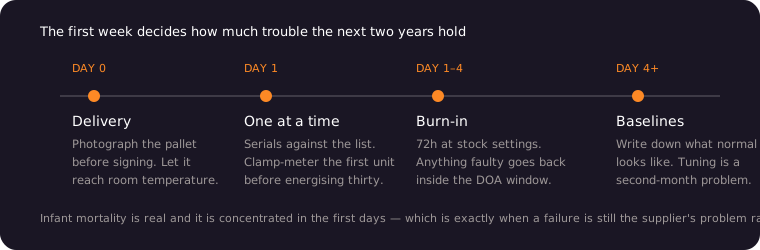
Everything up to delivery is a purchasing exercise. Everything after it is operations, and the transition catches people out. The first week decides how much trouble the next two years contain.
Before you cut the shrink wrap
Photograph the pallet as it comes off the truck, from two angles, with the shock indicators visible if fitted. If an indicator has tripped or the wrapping is damaged, note it on the carrier’s delivery document before signing. A signature on a clean receipt is very hard to walk back later.
Then let the machines acclimatise. Hardware that travelled through a cold winter and arrived into a warm room will condense moisture on and inside the chassis. Powering that up is how you turn a delivery into an insurance conversation. Give it several hours to reach room temperature — overnight if the difference was large.
The unpacking check
Go through every unit before any of them are racked. It takes an hour for a small deployment and saves days.
Check the serial on each machine against the packing list, and keep that list — it is the document a warranty claim will be built on. Confirm the model and the hashrate bin on the label match what the invoice says. Look for transit damage: bent fins, loose fan guards, anything rattling. Open nothing that is sealed; a warranty seal broken by a curious owner is a warranty ended by a curious owner.
Set aside anything that does not match. It is far easier to resolve a discrepancy while the whole shipment is still unracked.
First power-on, one machine at a time
Resist the urge to energise everything at once. Inrush current from thirty power supplies charging simultaneously will trip breakers that carry the running load perfectly well.
Bring up one unit. Let it reach a stable state. Confirm it gets an IP address, that the web interface responds, and that fans ramp and settle. Note the firmware version. Then add the next, in groups if you must, with a few seconds between.
While the first unit is running, take a clamp meter reading of its actual draw. Compare that with the nameplate. This is your one chance to catch a supply problem — sagging voltage, a miswired phase — with a single machine at risk instead of thirty.
Pool and identity configuration
Configure pools before burn-in, so the burn-in itself produces useful data.
Give every machine a worker name that maps to a physical position — rack, row, position. When a unit misbehaves in month nine you will read the name in a dashboard and need to know which box to walk to. worker047 tells you nothing; r2-c04 tells you everything.
Set a backup pool. Pools go down, and a machine with nowhere to submit work is a machine burning electricity for nothing.
Change default credentials on every unit. Mining hardware ships with well-known defaults and is a standing target on any network reachable from outside. Put the machines on their own VLAN with no inbound access from the internet, and reach them through a VPN if you need remote management. This takes an afternoon and prevents the entire category of remote-takeover incidents that periodically sweep this industry.
Burn-in: 72 hours that pay for themselves
Run everything at stock settings for at least three days before you consider the deployment accepted.
Infant mortality is real. Components that fail do so disproportionately in the first days, and a failure inside the DOA window is the supplier’s problem. The same failure discovered six weeks later, after you have declared the install complete, is a warranty queue.
During burn-in, watch three things. Per-board hashrate should be stable and even; one board consistently below its siblings is a fault developing. Chip temperatures should sit well inside the operating band with the room at its warmest, not its coolest. Rejected share rate should be low and steady; a climbing rate points at network or pool problems rather than hardware.
Anything that fails, misbehaves or runs measurably below its bin goes back inside the DOA window. Say so promptly and in writing.
The baselines to record
Before you move on, write down what “normal” looks like. In six months, when something feels wrong, this is the only way to know whether it is.
Record per-unit hashrate at a known ambient temperature, per-unit power draw measured at the socket, intake and exhaust temperatures at a few points in the room, the firmware version on each machine, and the total site draw at the meter. A spreadsheet is entirely sufficient.
Photograph the rack layout with worker names visible. Whoever maintains the site next — possibly you, having forgotten — will need it.
The first month
Two habits are worth forming immediately.
Check filters and airflow weekly. Dust accumulation is the single most common cause of gradual performance loss, and it is invisible until it is severe. In an agricultural or industrial building it can be quick.
Track output against your baseline, not against your model. The relevant question is whether the hardware is doing what it did on day four. Coin price and network difficulty will move on their own; hardware degradation hides underneath that noise unless you are watching the physical numbers.
What the first week is really for
It is not for optimisation. Leave firmware, clocks and voltages alone until you have a stable, documented baseline at stock settings. Tuning a system you have not yet characterised means you will not be able to tell whether a later problem is the tuning or the hardware.
Get it running, get it stable, get it written down. Optimisation is a second-month problem, and it is much easier when you know exactly what you started with.